
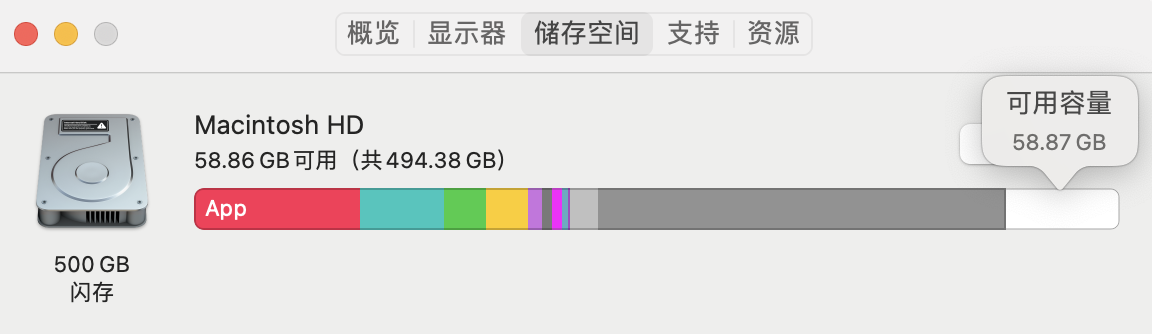
系统中显示的空间大小
下面是 115 网盘设置下载路径所展示的空间大小

iOS 其实也会出现这样的问题
iOS 其实也会出现这样的问题
 |
1
Puteulanus Jul 2, 2022  1 1
之前踩过一个坑,TimeMachine 的本地备份文件好像不会被算进去,系统设置里看着有很多空间但 Docker 老是空间不足,实际剩余空间是已经没有了
|
 |
2
darrh00 Jul 2, 2022 1
清理 TM 的 bash 函数,把以下内容写到 ~/.profile
function tmc() { before=$(df -hl /System/Volumes/Data |awk '{print $3}' |tail -n1) count=0 for snapshot in $(tmutil listlocalsnapshots /System/Volumes/Data|awk -F. '{print $4}');do let 'count++' echo "delete snapshot $snapshot" tmutil deletelocalsnapshots $snapshot; done after=$(df -hl /System/Volumes/Data |awk '{print $3}' |tail -n1) if [[ $count -ne 0 ]]; then echo "Total $count snapshot(s) deleted, Size change: $before ===> $after" else echo "No snapshot deleted" fi } function tml() { tmutil listlocalsnapshots /System/Volumes/Data|awk -F. '{print $4}' } source .profle 后执行 tmc |
 |
3
Building Jul 2, 2022 via iPhone 1
新的 api 可用空间类型: available ,opportunity 和 important ,important 是要存重要东西可用的空间,系统会帮你释放缓存,opportunity 是存不怎么重要的东西(比如缓存)可以用的空间,available 是实际的可用空间,important > available > opportunity
|
 Select Language