
linux 下多张网卡(都能通外网),想从指定网卡口出去 HTTP 请求。 网上的一个办法是创建 socket 的时候 bind 在某个网卡的 IP 上,但是我测试过了,这样只是源 IP 地址改变了(变成 bind 的那个网卡上的 IP 地址),但是最终出口就是包上的源 MAC 地址不变, 还是由路由表上的出口网卡决定的。。想问下 V 友有啥办法没
This topic created in 1847 days ago, the information mentioned may be changed or developed.
 |
1
refraction Oct 4, 2021
ip rule?
|
 |
2
izoabr Oct 4, 2021
iptables 先给指定的包打一个标记,然后用 ip route2 做策略路由
|
 |
3
shayuvpn0001 Oct 4, 2021
这个需求弄一下路由表就可以了。
|
 |
4
huangmingyou Oct 4, 2021
iptables fwmark 对 tcp 流量做标记,然后 ip rule 根据 fwmark 路由。
|
 |
5
ch2 Oct 4, 2021
用 docker 跑那个进程,用 ip route 改容器内部的路由表
设置不同网卡的 metrics 优先级,即可让你进程的流量走你想要的网卡 效果是 ip 协议级别的 |
 |
6
seers Oct 4, 2021
可以参考下 vlan,给包打 tag
|
 |
7
weyou Oct 4, 2021 via Android
socket 使用 SO_BINDTODEVICE 选项绑定网卡,会忽略路由,直接从指定的网卡出去,缺点是需要 root 权限。
|
 |
8
shoaly Oct 4, 2021
如果只是 http 请求的话 就简单了, 你在目标出口 ip 地址上 搭建一个 socks5 代理, 然后 http 请求的方法里面把这个 s5 的代理用上就行了
|
 |
11
julyclyde Oct 5, 2021
首先,这就不是 tcp 的事
|
 |
12
bybyte OP @izoabr
@huangmingyou @shayuvpn0001 @refraction 想请教下大佬们,我试着用 ip rule 做了下,但出现了点小问题 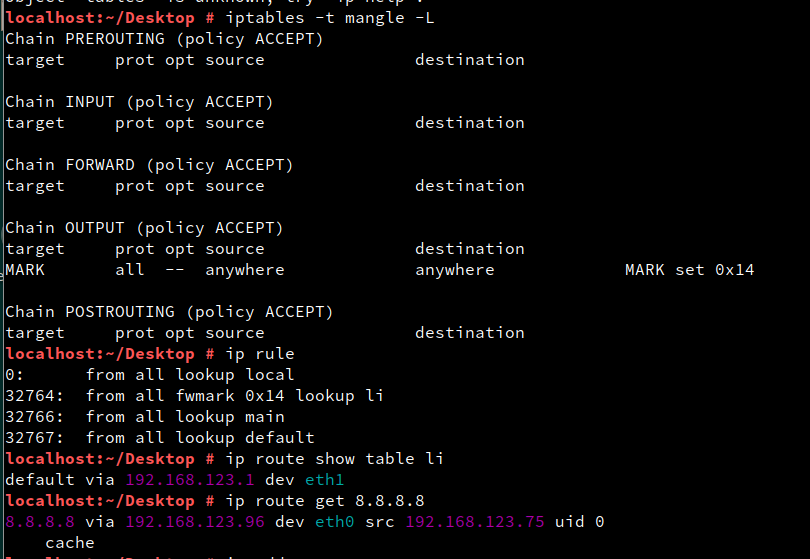 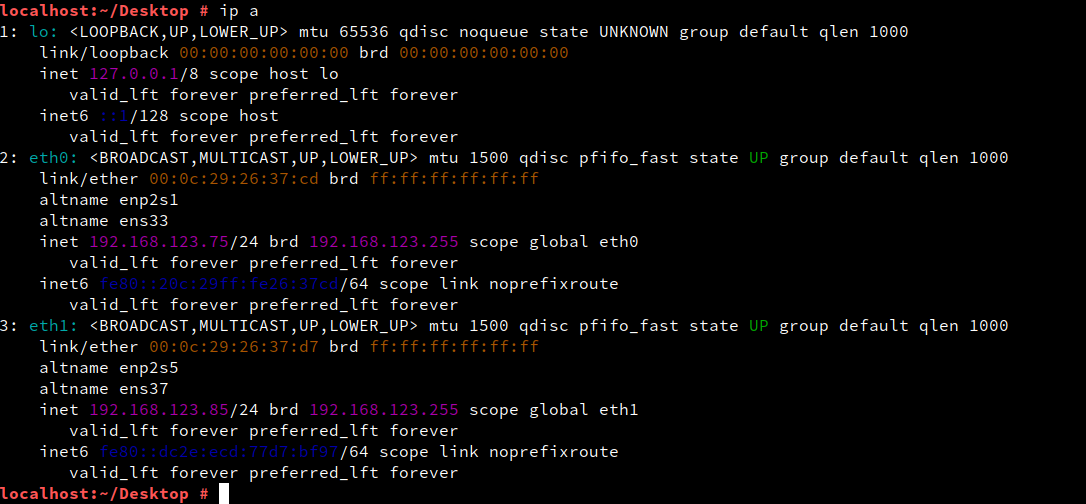  这样设置好了按理说本机发出的数据流量会被标记为 20 然后在策略路由的时候走路由表 li,然后根据路由表的规则走 eth1 出口的吧? 但是最后发现本机发出的数据并没有走路由表 li 依然还是按照 route -n 路由表的默认路由项走 不知道怎么回事,请教下大佬们🙇 |
|
13
bybyte OP @bybyte 最后那个图是主路由表的信息
localhost:~/Desktop # route -n Kernel IP routing table Destination Gateway Genmask Flags Metric Ref Use Iface 0.0.0.0 192.168.123.96 0.0.0.0 UG 100 0 0 eth0 192.168.123.0 0.0.0.0 255.255.255.0 U 100 0 0 eth0 192.168.123.0 0.0.0.0 255.255.255.0 U 101 0 0 eth1 |
|
14
bybyte OP 
随机打 mark 随机走出口,出口是变了,源 MAC 是变了,,但是源 IP 还是固定的不变的。 |
|
15
bybyte OP 解决了,在 nat 表的 POSTROUTING 链里根据出口网卡做 SNAT 即可。。。。终于解决了。。。
mangle Chain OUTPUT (policy ACCEPT) target prot opt source destination MARK all -- anywhere anywhere statistic mode random probability 0.50000000000 MARK set 0x10 MARK all -- anywhere anywhere statistic mode random probability 0.50000000000 MARK set 0x11 nat Chain POSTROUTING (policy ACCEPT) target prot opt source destination SNAT all -- anywhere anywhere to:192.168.123.75 SNAT all -- anywhere anywhere to:192.168.123.85 |
 |
16
ttvast Dec 9, 2021
没必要用到 iptables
为每张网卡设定一个 table ip route add default via gw_nicX table tb_nicX ip rule add from ip_nicX lookup tb_nicX 有多少块网卡就创建多少条策略 |
|
17
ttvast Dec 9, 2021
晕,你居然把两张网卡放同一个网段?
溜了 |

 Select Language