› NGINX
› NGINX Trac
› 3rd Party Modules
› Security Advisories
› CHANGES
› OpenResty
› ngx_lua
› Tengine
在线学习资源
› NGINX 开发从入门到精通
NGINX Modules
› ngx_echo
zhangsan5421
V2EX  ›  NGINX

阿里云服务器开通实例,但是浏览器不能访问是怎么回事?

  •  
  •   zhangsan5421 · Jul 25, 2020 · 5679 views
    This topic created in 2295 days ago, the information mentioned may be changed or developed.

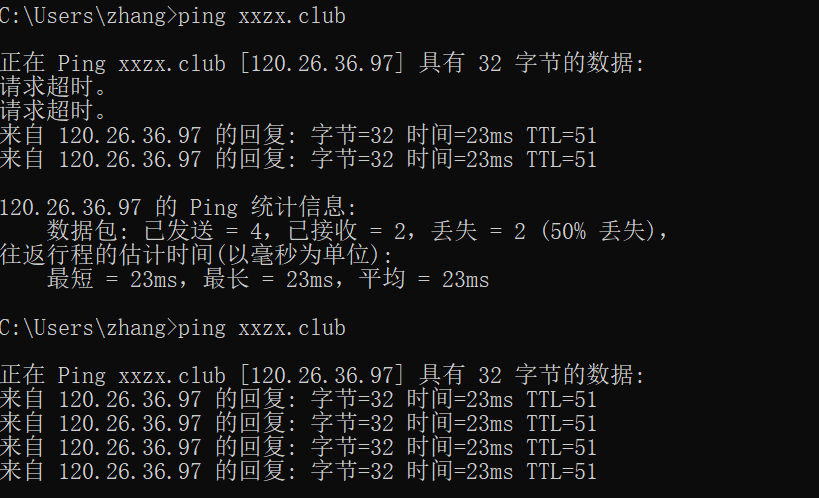
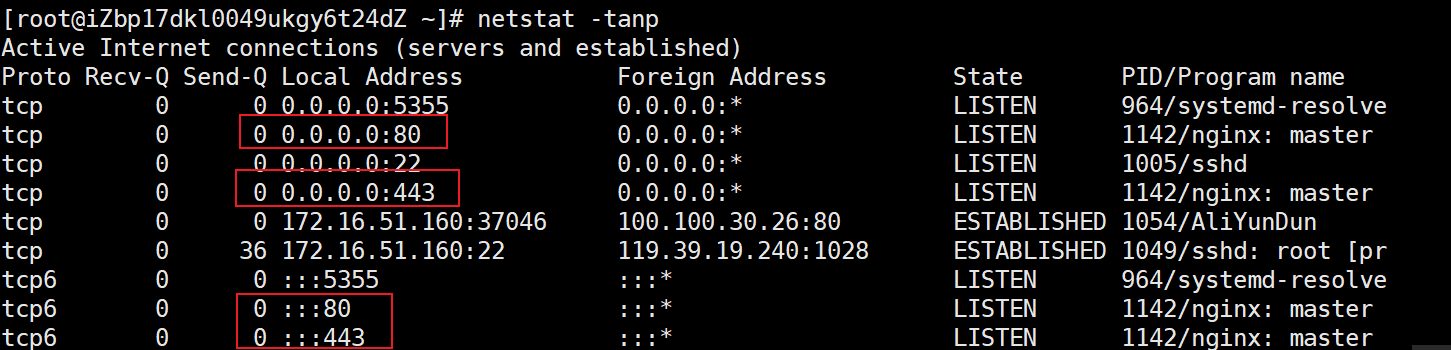
    在阿里云申请了域名、空间、绑定了域名,申请了 ssl,通过浏览器不能正常访问。不知道怎么而回事? 下面是检测端口的操作截图。 UxjOsJ.png 通过命令窗口检查域名绑定情况。我的域名是:xxzx.club UxvPzD.png 下面是 nginx.conf 的设置
    vim /etc/nginx/nginx.conf
    
    # For more information on configuration, see:
    #   * Official English Documentation: http://nginx.org/en/docs/
    #   * Official Russian Documentation: http://nginx.org/ru/docs/
    
    user nginx;
    worker_processes auto;
    error_log /var/log/nginx/error.log;
    pid /run/nginx.pid;
    
    # Load dynamic modules. See /usr/share/doc/nginx/README.dynamic.
    include /usr/share/nginx/modules/*.conf;
    
    events {
        worker_connections 1024;
    }
    
    http {
        log_format  main  '$remote_addr - $remote_user [$time_local] "$request" '
                          '$status $body_bytes_sent "$http_referer" '
                          '"$http_user_agent" "$http_x_forwarded_for"';
    
        access_log  /var/log/nginx/access.log  main;
    
        sendfile            on;
        tcp_nopush          on;
        tcp_nodelay         on;
        keepalive_timeout   65;
        types_hash_max_size 2048;
    
        include             /etc/nginx/mime.types;
        default_type        application/octet-stream;
    
        # Load modular configuration files from the /etc/nginx/conf.d directory.
        # See http://nginx.org/en/docs/ngx_core_module.html#include
        # for more information.
        include /etc/nginx/conf.d/*.conf;
    
        server {
            listen       80 default_server;
            listen       [::]:80 default_server;
            server_name xxzx.club   www.xxzx.club;
            root         /usr/share/nginx/html;
    
            # Load configuration files for the default server block.
            include /etc/nginx/default.d/*.conf;
            rewrite ^(.*) https://$host$1 permanent;
    
            location / {
            root    /usr/share/nginx/html;
            index   index.html;
            }
    
    
            error_page 404 /404.html;
                location = /40x.html {
            }
    
            error_page 500 502 503 504 /50x.html;
                location = /50x.html {
            }
        }
    
    # Settings for a TLS enabled server.
    #
        server {
            listen       443 ssl http2 default_server;
            listen       [::]:443 ssl http2 default_server;
            server_name  xxzx.club www.xxzx.club;
            root         /usr/share/nginx/html;
            ssl     on;
            ssl_certificate /etc/nginx/cert/www.xxzx.club.pem;
            ssl_certificate_key /etc/nginx/cert/www.xxzx.club.key;
            ssl_session_cache shared:SSL:1m;
            ssl_session_timeout  10m;
           # ssl_ciphers PROFILE=SYSTEM;
            #rewrite ^(.*)$ https://www.xxzx.club permanent; 
            ssl_prefer_server_ciphers on;
            ssl_ciphers ECDHE-RSA-AES128-GCM-SHA256:ECDHE:ECDH:AES:HIGH:!NULL:!aNULL:!MD5:!ADH:!RC4;
            ssl_protocols TLSv1 TLSv1.1 TLSv1.2;
            # Load configuration files for the default server block.
            include /etc/nginx/default.d/*.conf;
    
            location / {
            root    /usr/share/nginx/html;
            index   index.html;
            }
    
            error_page 404 /404.html;
                location = /40x.html {
            }
    
            error_page 500 502 503 504 /50x.html;
                location = /50x.html {
            }
        }
    
    }


    在浏览器中输入 https://xxzx.club 或者 https://www.xxzx.club 都会出现下面的无法打开的界面。 UzCNk9.png
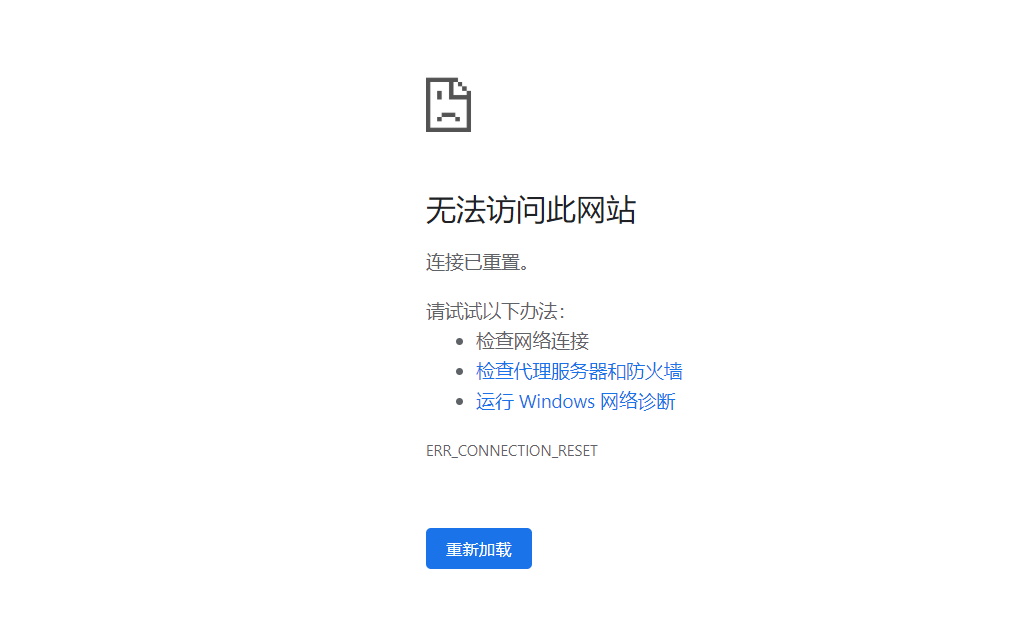
    不知道错在哪里地方,请大家指教。谢谢。

    26 replies  •  2020-07-26 21:48:06 +08:00
    xbchaonba
    xbchaonba
    Jul 25, 2020
    1
    阿里云控制台看下安全策略里面有没有开放 80 和 443 端口
    imnpc
    imnpc
    Jul 25, 2020
    2
    国内服务器 域名备案了吗
    imnpc
    imnpc
    Jul 25, 2020
    3
    网站暂时无法访问

    该网站未根据工信部相关法律进行备案
    bruce0
    bruce0
    Jul 25, 2020
    4
    1.去阿里云的控制台看一下端口有没有打开
    2.域名是否备案了. 可以给 Nginx 加个配置,直接用 ip 访问以下试试
    3.看一下 Nginx 的 log,看一下 Nginx 有没有收到请求
    zhangsan5421
    zhangsan5421
    OP
    Jul 25, 2020
    5
    @xbchaonba 已经确定在安全策略下开通了 80 和 443 端口。
    ![安全策略.png]( https://i.loli.net/2020/07/25/rfL39V2xEsjWtAN.png)
    leoleoasd
    leoleoasd
    Jul 25, 2020
    6
    域名没有备案, 被 sni 阻断了
    zhangsan5421
    zhangsan5421
    OP
    Jul 25, 2020
    7
    @imnpc 第一次开通网站,网站备案,我以为只有域名备案就可以了。还要网站备案。现在已经完成备案。期待下周能收到备案好。
    zhangsan5421
    zhangsan5421
    OP
    Jul 25, 2020
    8
    @leoleoasd 谢谢。不知道备案的重要性。自己太 low 了
    lysS
    lysS
    Jul 25, 2020
    9
    机器换成香港的,就不用备案
    shenwu35
    shenwu35
    Jul 25, 2020
    10
    我是看楼主头像进来的,hot
    FurN1
    FurN1
    Jul 25, 2020 via iPhone
    11
    备案真的麻烦……
    RickyC
    RickyC
    Jul 25, 2020
    12
    我打开后显示需要备案.
    opengps
    opengps
    Jul 25, 2020
    13
    我来了,不过正确答案已经出现在一楼,我就不重复了
    我补充下别的楼层的小偏差:不备案不应该是打不开,而是强制跳转提示备案
    yingfengi
    yingfengi
    Jul 25, 2020
    14
    正如楼上所说,应该是没有放通端口,如果是备案原因是会跳转备案页面。
    虽然看回复,安全策略开了 80 443,但是是否在该安全组加入了对应 ecs 实例,否则实际还是拒绝的
    yingfengi
    yingfengi
    Jul 25, 2020
    15
    刚才试了下,https 方式访问 IP,是红帽的 nginx 页面。
    https+域名方式访问建立安全连接失败

    连接到 xxzx.club 时发生错误。PR_CONNECT_RESET_ERROR

    由于不能验证所收到的数据是否可信,无法显示您想要查看的页面。
    建议向此网站的管理员反馈这个问题。

    所以估计是配置有问题。


    ssl_certificate /etc/nginx/cert/www.xxzx.club.pem;
    ssl_certificate_key /etc/nginx/cert/www.xxzx.club.key;

    证书文件有在吗?就算是自签发的证书
    realpg
    realpg
    Jul 25, 2020
    16
    被信安系统拦截了
    十有八九是未备案域名或者没在阿里云做接入
    imkuang
    imkuang
    Jul 25, 2020
    17
    @opengps 阿里云现在不备案的话,http 访问会出现备案提示,https 访问就是这样“连接已重置”,你自己去试一下就知道了
    imkuang
    imkuang
    Jul 25, 2020
    18
    @xiri 上面的 http 、https 更严格的来说是 80 、443 端口,用其他端口不会出问题
    imkuang
    imkuang
    Jul 25, 2020
    19
    @yingfengi 看我上面的回复,阿里云现在不备案的话使用域名+80 端口 http 访问会出现备案拦截页面,域名+443 端口 https 访问就是这样被 sni 阻断,显示“连接已重置”。

    楼主的域名的解析记录现在还在,你可以自己试一下手动用 http 访问就能看到备案拦截页面了
    huanxianghao
    huanxianghao
    Jul 25, 2020
    20
    1 、有可能没备案完成
    2 、查看下网站目录的所有者是不是 nginx
    zhangsan5421
    zhangsan5421
    OP
    Jul 26, 2020
    21
    @lysS 下次找个国外的服务器。
    zhangsan5421
    zhangsan5421
    OP
    Jul 26, 2020
    22
    @shenwu35 看样子第一印象很重要。
    zhangsan5421
    zhangsan5421
    OP
    Jul 26, 2020
    23
    @IgniteWhite 已经申请备案了。希望周一或者周二能完成。
    zhangsan5421
    zhangsan5421
    OP
    Jul 26, 2020
    24
    @xiri 我用的是 chrome 浏览器。http 之后会改成 https 了。我现在申请备案了。希望顺利通过。
    zhangsan5421
    zhangsan5421
    OP
    Jul 26, 2020
    25
    我现在知道网站备案真的麻烦。今天收到阿里的电话,阿里通过了,还要到管理局审核。又要等待。
    zhensjoke
    zhensjoke
    Jul 26, 2020
    26
    应该是安全组的问题...备案应该有阻断提示的。
    About   ·   Help   ·   Advertise   ·   Blog   ·   API   ·   FAQ   ·   Privacy   ·   Solana   ·   1023 Online   Highest 6679   ·     Select Language
    创意工作者们的社区
    World is powered by solitude
    VERSION: 3.9.8.5 · 46ms · UTC 23:06 · PVG 07:06 · LAX 15:06 · JFK 18:06
    ♥ Do have faith in what you're doing.