V2EX = way to explore
V2EX 是一个关于分享和探索的地方
Sign Up Now
For Existing Member  Sign In
推荐学习书目
Learn Python the Hard Way
Python Sites
PyPI - Python Package Index
http://diveintopython.org/toc/index.html
Pocoo
值得关注的项目
PyPy
Celery
Jinja2
Read the Docs
gevent
pyenv
virtualenv
Stackless Python
Beautiful Soup
结巴中文分词
Green Unicorn
Sentry
Shovel
Pyflakes
pytest
Python 编程
pep8 Checker
Styles
PEP 8
Google Python Style Guide
Code Style from The Hitchhiker's Guide
liuliliuli2017
V2EX  ›  Python

玩法收藏/云服务器/Python3 环境安装 PySpider 爬虫框架

  •  
  •   liuliliuli2017 · Mar 21, 2017 · 2468 views
    This topic created in 3329 days ago, the information mentioned may be changed or developed.

    又看到一个关于爬虫的帖子,嘻嘻,收录待用,修改转载已取得腾讯云授权


    大家好,本篇文章为大家讲解腾讯云主机上 PySpider 爬虫框架的安装。

    首先,在此附上项目的地址,以及官方文档

    PySpider

    官方文档

    安装流程

    pip

    首先确保你已经安装了 pip ,若没有安装,请参照此文

    phantomjs

    PhantomJS 是一个基于 WebKit 的服务器端 JavaScript API 。它全面支持 web 而不需浏览器支持,其快速、原生支持各种 Web 标准: DOM 处理、 CSS 选择器、 JSON 、 Canvas 和 SVG 。 PhantomJS 可以用于页面自动化、网络监测、网页截屏以及无界面测试等。

    安装方式

    以上附有官方安装方式,如果你是 Ubuntu ,还可以使用如下命令:

    sudo apt-get install phantomjs


    pyspider

    直接运行 pip 安装即可

    pip install pyspider


    测试

    安装完成之后,如果没有任何的报错,那就 OK

    命令行输入

    pyspider all


    然后浏览器访问 http://localhost:5000

    观察一下效果,如果可以正常出现 PySpider 的页面,那证明一切 OK

    在此附图一张,这是我写了几个爬虫之后的界面。
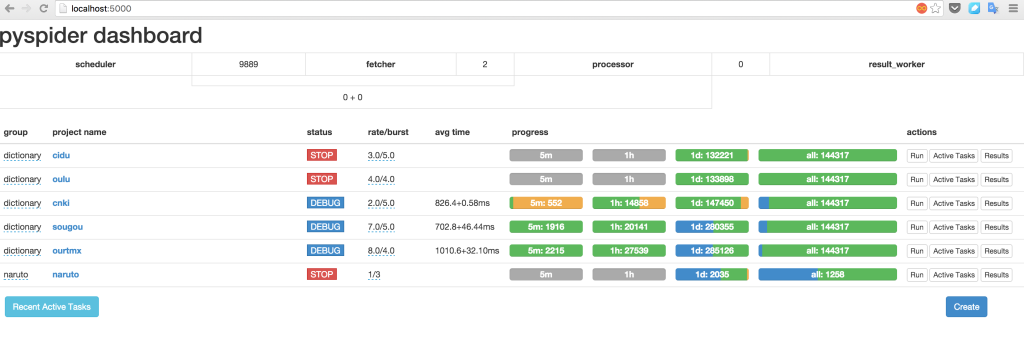

    原文来自: https://www.qcloud.com/community/user/542010001488460189

    4 replies    2017-03-22 22:19:46 +08:00
    J0022ZjV7055oN64
        1
    J0022ZjV7055oN64  
       Mar 22, 2017
    • 这里绝对不会全文转载任何文章,而只会以链接方式分享
    Antidictator
        2
    Antidictator  
       Mar 22, 2017 via Android
    @yansyuei 如果是作者,那就可以了吧
    J0022ZjV7055oN64
        3
    J0022ZjV7055oN64  
       Mar 22, 2017
    @Antidictator #2 又看到一个关于爬虫的帖子,嘻嘻,收录待用,修改转载已取得腾讯云授权
    liuliliuli2017
        4
    liuliliuli2017  
    OP
       Mar 22, 2017
    @yansyuei 抱歉才看到使用须知,转载仅供自用,有人感兴趣一起看也好。本以为已申请到腾讯云授权就没事了,之后我会只对文章进行摘抄,以免有违规嫌疑。
    About   ·   Help   ·   Advertise   ·   Blog   ·   API   ·   FAQ   ·   Solana   ·   2331 Online   Highest 6679   ·     Select Language
    创意工作者们的社区
    World is powered by solitude
    VERSION: 3.9.8.5 · 51ms · UTC 01:38 · PVG 09:38 · LAX 18:38 · JFK 21:38
    ♥ Do have faith in what you're doing.
