
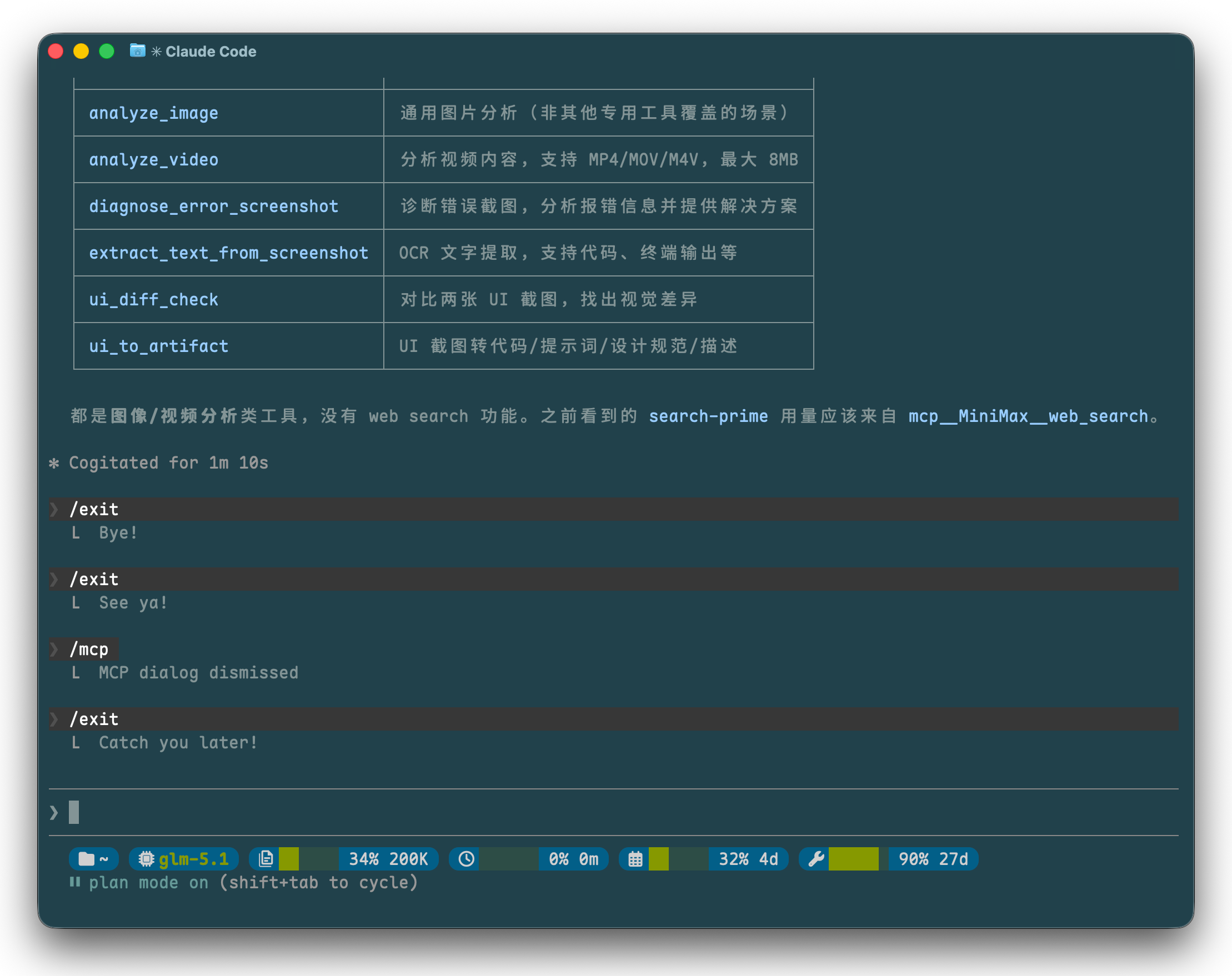
效果如图,没做其他适配,需要适配可以让 cc 继续搓,请先安装 Nerd Font 并作为终端字体😄
从左到右依次是:
- 当前工作目录
- 当前模型
- 上下文窗口当前用量和上限(单位:K 、M )
- 套餐 5 小时用量百分比和重置时间(时间:一小时内显示分钟 *m 、一天内显示小时 *h 、一天以上显示天数 *d )
- 套餐周用量百分比和重置时间
- 套餐月工具调用用量百分比和重置时间
在 ~/.cluade/settings.json中添加配置:
{
  "statusLine": {
    "type": "command",
    "command": "~/.claude/statusline.sh",
    "padding": 0
  }
}
- 创建
~/.claude/statusline.sh
#!/bin/bash

input=$(cat)

# Extract fields from stdin JSON
model=$(echo "$input" | jq -r '.model.id // "unknown"')
curr_dir=$(echo "$input" | jq -r '.workspace.current_dir // "~"')
curr_dir="${curr_dir/#$HOME/~}"
ctx_pct=$(echo "$input" | jq -r '.context_window.used_percentage // 0')
ctx_int=$(echo "$ctx_pct" | awk '{if ($1 <= 1) printf "%.0f", $1*100; else printf "%.0f", $1}')
# Calculate context total
ctx_total=$(echo "$input" | jq -r '.context_window.context_window_size // 0' 2>/dev/null)
ctx_total=${ctx_total:-0}
# Format context total as xk or xm
if (( ctx_total >= 1000000 )); then
  ctx_total_str="$(( (ctx_total + 50000) / 100000 ))M"
elif (( ctx_total >= 1000 )); then
  ctx_total_str="$(( (ctx_total + 500) / 1000 ))K"
else
  ctx_total_str="${ctx_total}"
fi

# Cache + API call for usage data
cache_file="/tmp/.claude-statusline-usage-cache"
cache_ttl=60
now=$(date +%s)
api_body=""

if [[ -f "$cache_file" ]]; then
  cache_time=$(head -1 "$cache_file")
  if (( now - cache_time < cache_ttl )); then
    api_body=$(tail -n +2 "$cache_file")
  fi
fi

if [[ -z "$api_body" ]]; then
  base_url=$(echo "$ANTHROPIC_BASE_URL" | sed -E 's|^( https?://[^/]+).*|\1|')
  quota_url="${base_url}/api/monitor/usage/quota/limit"
  api_body=$(curl -sf --max-time 5 \
    -H "Authorization: ${ANTHROPIC_AUTH_TOKEN}" \
    -H "Content-Type: application/json" \
    "$quota_url" 2>/dev/null)
  if [[ -n "$api_body" ]]; then
    printf '%s\n%s' "$now" "$api_body" > "$cache_file"
  elif [[ -f "$cache_file" ]]; then
    api_body=$(tail -n +2 "$cache_file")
  fi
fi

# Extract usage percentages
usage_5h=0
usage_weekly=0
tool_usage=0
if [[ -n "$api_body" ]]; then
  usage_5h=$(echo "$api_body" | jq -r '[.data.limits[] | select(.type=="TOKENS_LIMIT" and .unit==3)][0].percentage // 0' 2>/dev/null)
  usage_weekly=$(echo "$api_body" | jq -r '[.data.limits[] | select(.type=="TOKENS_LIMIT" and .unit==6)][0].percentage // 0' 2>/dev/null)
  tool_usage=$(echo "$api_body" | jq -r '[.data.limits[] | select(.type=="TIME_LIMIT")][0].percentage // 0' 2>/dev/null)
  reset_5h=$(echo "$api_body" | jq -r '[.data.limits[] | select(.type=="TOKENS_LIMIT" and .unit==3)][0].nextResetTime // 0' 2>/dev/null)
  reset_weekly=$(echo "$api_body" | jq -r '[.data.limits[] | select(.type=="TOKENS_LIMIT" and .unit==6)][0].nextResetTime // 0' 2>/dev/null)
  reset_tool=$(echo "$api_body" | jq -r '[.data.limits[] | select(.type=="TIME_LIMIT")][0].nextResetTime // 0' 2>/dev/null)
fi
usage_5h_int=$(printf '%.0f' "$usage_5h")
usage_weekly_int=$(printf '%.0f' "$usage_weekly")
tool_usage_int=$(printf '%.0f' "$tool_usage")

# Calculate time until reset, format as xd, xh or xm
now_ms=$(( now * 1000 ))
format_reset() {
  local diff=$(( ($1 - now_ms) / 1000 ))
  (( diff < 0 )) && diff=0
  if (( diff >= 86400 )); then
    printf '%dd' $(( (diff + 43200) / 86400 ))
  elif (( diff >= 3600 )); then
    printf '%dh' $(( (diff + 1800) / 3600 ))
  else
    printf '%dm' $(( (diff + 30) / 60 ))
  fi
}
reset_5h_str=$(format_reset "$reset_5h")
reset_weekly_str=$(format_reset "$reset_weekly")
reset_tool_str=$(format_reset "$reset_tool")

# Progress bar: outputs bar then restores badge context colors
make_bar() {
  local pct=$1 width=6 ctx="$2"
  local filled empty i filled_str="" empty_str=""
  filled=$(( (pct * width + 50) / 100 ))
  (( filled > width )) && filled=$width
  (( filled < 0 )) && filled=0
  empty=$(( width - filled ))
  for ((i=0; i<filled; i++)); do filled_str+="█"; done
  for ((i=0; i<empty; i++)); do empty_str+="░"; done
  printf '\033[32m%s\033[0m\033[2;32m%s\033[0m%b' "$filled_str" "$empty_str" "$ctx"
}

# Badge style
BGC=24
BG="\033[48;5;${BGC}m"
FG='\033[38;5;252m'
CTX="${BG}${FG}"
RST='\033[0m'

# Powerline rounded caps (UTF-8 bytes)
LEFT=$(printf '\xee\x82\xb6')   # U+E0B6
RIGHT=$(printf '\xee\x82\xb4')  # U+E0B4

# Nerd Font icons (UTF-8 bytes)
I_DIR=$(printf '\xef\x81\xbb')    # U+F07B Folder
I_MODEL=$(printf '\xef\x8b\x9b')  # U+F2DB Microchip
I_CTX=$(printf '\xf3\xb1\x94\x98')  # Context icon
I_5H=$(printf '\xef\x80\x97')     # U+F017 Clock
I_WEEK=$(printf '\xef\x81\xb3')   # U+F073 Calendar
I_TOOL=$(printf '\xef\x82\xad')   # U+F0AD Wrench

# Output - each badge: LEFT_CAP[icon]content RIGHT_CAP space
# Folder
printf "\033[38;5;${BGC}m%s${CTX}%s %s" "$LEFT" "$I_DIR" "$curr_dir"
printf "\033[38;5;${BGC}m\033[49m%s${RST} " "$RIGHT"

# Model (bold green name)
printf "\033[38;5;${BGC}m%s${CTX}%s \033[1;32m%s" "$LEFT" "$I_MODEL" "$model"
printf "\033[22m\033[38;5;${BGC}m\033[49m%s${RST} " "$RIGHT"

# Context
printf "\033[38;5;${BGC}m%s${CTX}%s " "$LEFT" "$I_CTX"
make_bar "$ctx_int" "$CTX"
printf " %d%% %s\033[38;5;${BGC}m\033[49m%s${RST} " "$ctx_int" "$ctx_total_str" "$RIGHT"

# 5h usage
printf "\033[38;5;${BGC}m%s${CTX}%s " "$LEFT" "$I_5H"
make_bar "$usage_5h_int" "$CTX"
printf " %d%% %s\033[38;5;${BGC}m\033[49m%s${RST} " "$usage_5h_int" "$reset_5h_str" "$RIGHT"

# Weekly usage
printf "\033[38;5;${BGC}m%s${CTX}%s " "$LEFT" "$I_WEEK"
make_bar "$usage_weekly_int" "$CTX"
printf " %d%% %s\033[38;5;${BGC}m\033[49m%s${RST} " "$usage_weekly_int" "$reset_weekly_str" "$RIGHT"

# Tool usage
printf "\033[38;5;${BGC}m%s${CTX}%s " "$LEFT" "$I_TOOL"
make_bar "$tool_usage_int" "$CTX"
printf " %d%% %s\033[38;5;${BGC}m\033[49m%s${RST}\n" "$tool_usage_int" "$reset_tool_str" "$RIGHT"


 Select Language