V2EX = way to explore
V2EX 是一个关于分享和探索的地方
Sign Up Now
For Existing Member Sign In

This topic created in 64 days ago, the information mentioned may be changed or developed.
TinyImage
基于 Tinify API 的 macOS 图片压缩工具,一键在 Finder 工具栏压缩图片。
功能
- Finder 工具栏一键压缩
- 支持图片和文件夹批量处理
- 支持 PNG 、JPG 、JPEG 、WebP 、AVIF 格式
- 灵活提示(弹窗、通知或静默)
- 每月免费压缩 500 张,无 5MB 限制,不够用可多申请几个 API Key
快速开始
安装
- 下载 TinyImage.dmg
- 双击 DMG ,将
TinyImage.app拖到/Applications(应用程序)文件夹 -
打开终端,执行以下命令去除隔离属性:
xattr -d com.apple.quarantine /Applications/TinyImage.app - 按住
⌘ Command键,用鼠标将TinyImage.app拖到 Finder 工具栏
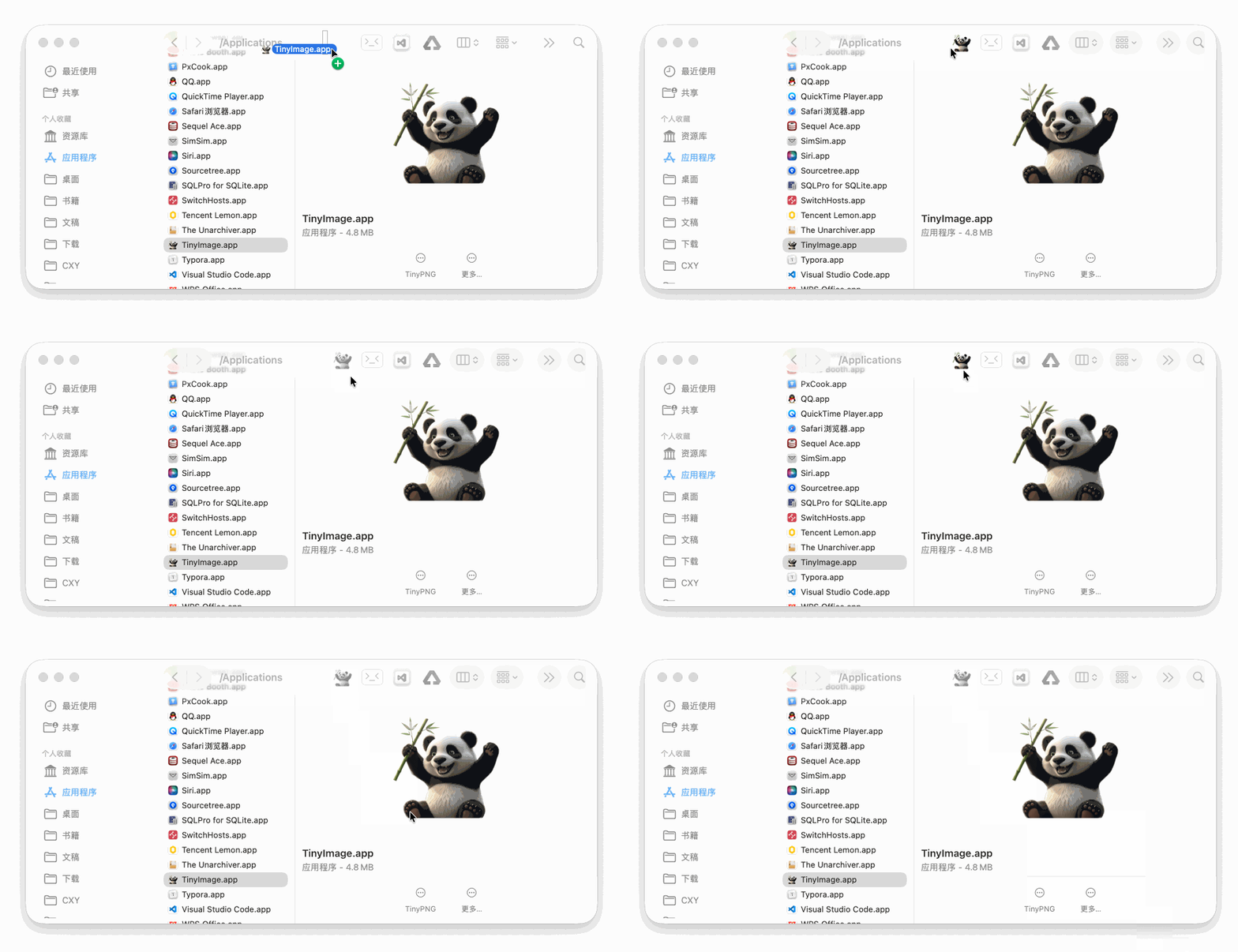
申请 API Key
前往 Tinify 官网 注册,免费获得 API Key 。
配置环境变量
复制下方命令,将 your_api_key_here 替换为你的真实 API Key,粘贴到终端执行:
推荐方式(一条命令自动完成)
如果你使用的是 zsh(默认):
echo 'export TINIFY_IMAGE_API_KEY="your_api_key_here"' >> ~/.zshrc && echo 'export TINIFY_SUCCESS_NOTIFICATION_TYPE="dialog"' >> ~/.zshrc && source ~/.zshrc
如果你使用的是 bash:
echo 'export TINIFY_IMAGE_API_KEY="your_api_key_here"' >> ~/.bash_profile && echo 'export TINIFY_SUCCESS_NOTIFICATION_TYPE="dialog"' >> ~/.bash_profile && source ~/.bash_profile
验证是否配置成功
执行命令检查:
echo $TINIFY_IMAGE_API_KEY
如果显示你的 API Key ,说明配置成功 ✅
开始使用
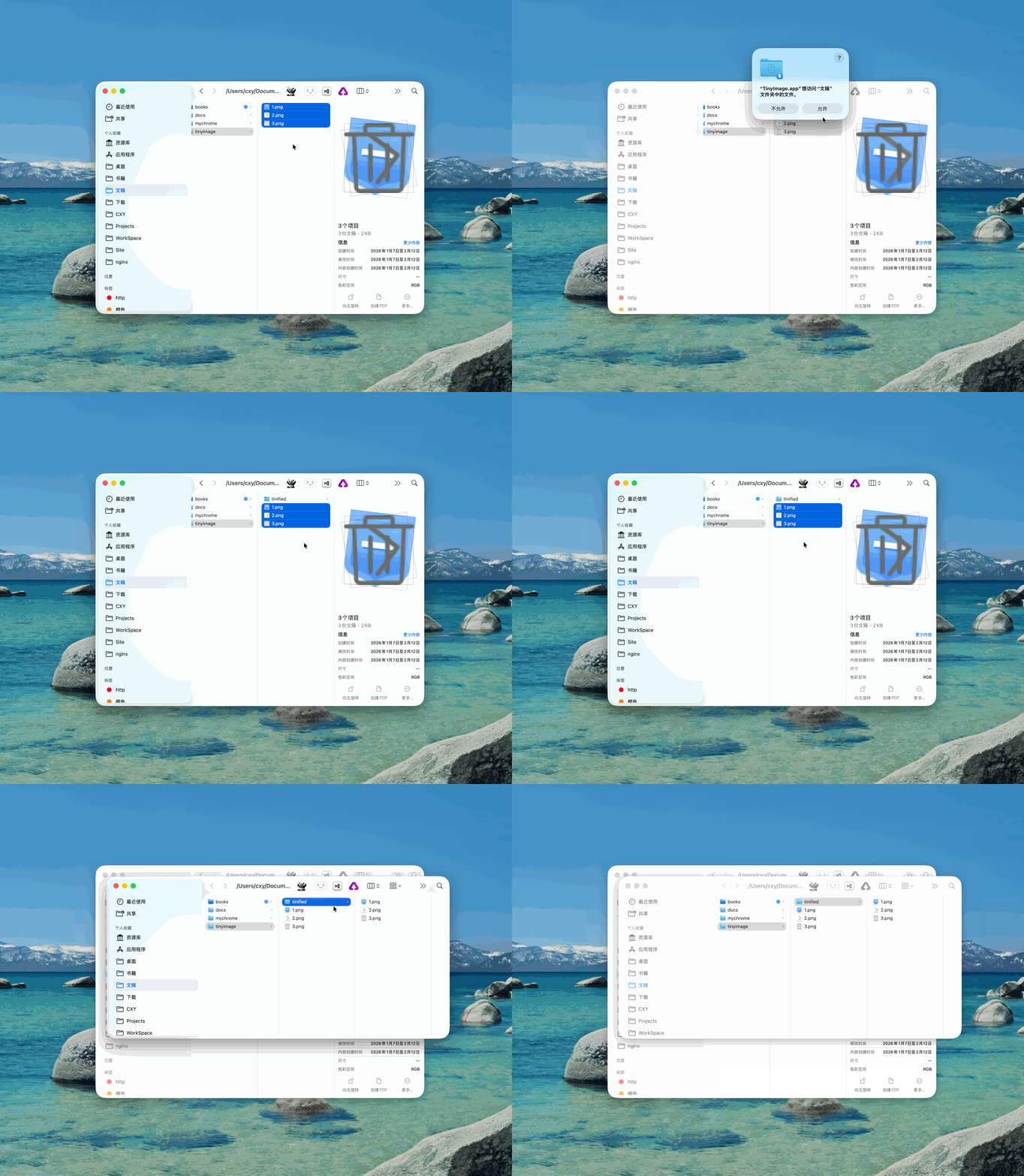
- 在 Finder 中选择要压缩的图片或文件夹
- 点击工具栏上的 TinyImage 图标
- 首次使用需要同意权限请求
- 等待完成(需要上传→压缩→下载)
压缩后的图片保存在 tinified 文件夹中。
提示方式配置
修改 TINIFY_SUCCESS_NOTIFICATION_TYPE 环境变量的值:
| 值 | 效果 |
|---|---|
dialog |
弹窗提示(推荐) |
notification |
系统通知 |
none |
静默(无提示) |
修改方法(同样替换 API Key ):
# zsh 用户
echo 'export TINIFY_SUCCESS_NOTIFICATION_TYPE="notification"' >> ~/.zshrc && source ~/.zshrc

# bash 用户
echo 'export TINIFY_SUCCESS_NOTIFICATION_TYPE="notification"' >> ~/.bash_profile && source ~/.bash_profile

 Select Language